
How to spot a phishing message
Phishing messages try to get you to hand over a password, payment details or access to your device by pretending to come from someone you trust. They are the starting point of many account takeovers and malware infections. The good news is that most share a few recognisable signs.
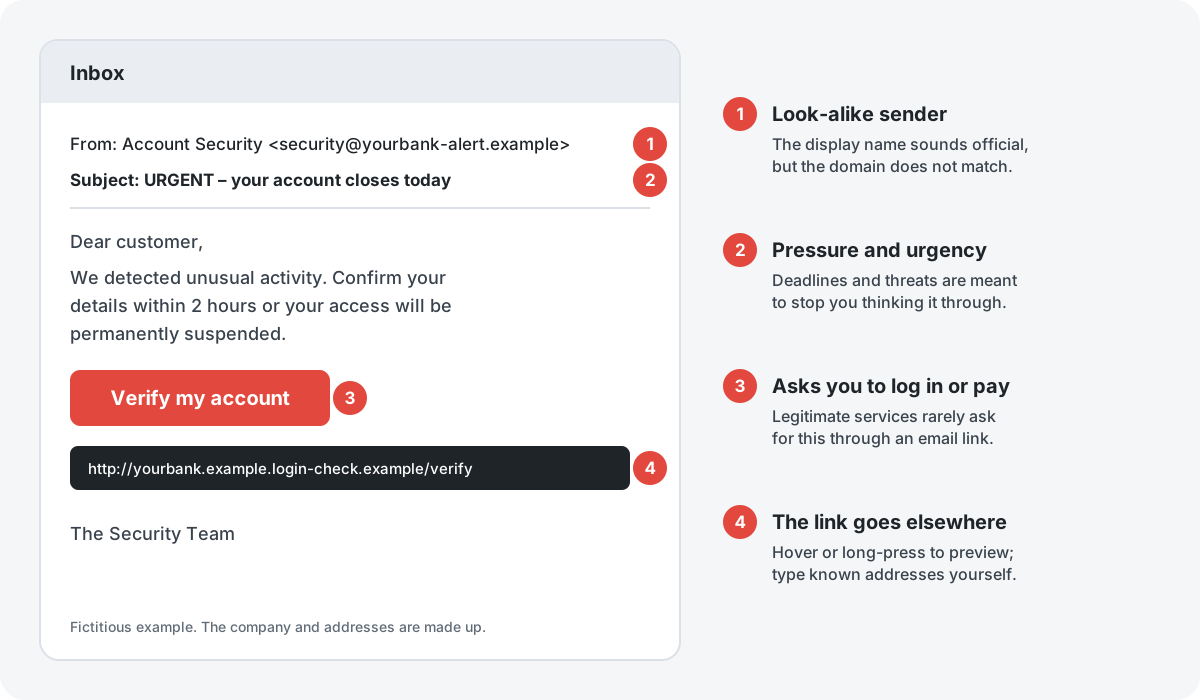
The warning signs
1. The sender is not quite right
The display name may say “Your Bank” or “Delivery Service”, but the actual address uses a different or slightly misspelled domain, or a free webmail account. On a phone, tap the sender name to see the full address.
2. Urgency, threats or prizes
“Your account will be closed today”, “Unpaid customs fee”, “You have won”. Pressure is designed to make you act before you think. Real organisations rarely set deadlines of a few hours by email or text.
3. A request for credentials, codes or payment
Be very wary of any message that asks you to log in through a link, confirm card details, or read out a one-time code. A legitimate bank will never ask you for a one-time code that you received to approve a transaction.
4. Links that go somewhere else
Hover over a link on a computer, or press and hold it on a phone, to preview the real address before opening it. Look at the part just before the first single slash: yourbank.example.login-check.example belongs to login-check.example, not to your bank. When in doubt, do not use the link at all. Type the address you know, or use the official app.
Other clues
- Unexpected attachments, especially archives (.zip), documents that ask you to “enable content”, or files with double extensions.
- Generic greetings and unusual wording. Note that AI tools now make polished, error-free phishing common, so good grammar proves nothing.
- Messages that move you to another channel, such as “reply on WhatsApp” or “call this number”.
- Requests from a “boss” or “family member” for gift cards or urgent transfers.
What to do with a suspicious message
- Do not click, reply or call numbers in it.
- Check independently. Contact the organisation using details from its official website, your card or a previous statement.
- Report it. Most email services have a “Report phishing” option. Banks usually have a dedicated address for forwarding phishing.
- Delete it.
If you have already clicked or entered details
- Passwords: change the password of the affected account straight away, from a device you trust, and anywhere else you used the same password.
- Bank or card details: call your bank using the number on your card. Ask it to block the card or watch for fraudulent transactions.
- Two-step login: switch it on for the affected account if it is not already on, and check for unknown devices or forwarding rules.
- Downloads: if you opened an attachment or installed something, disconnect from the internet and run a full scan with your security software.
- Report fraud: if you lost money, report it to the police. In the Czech Republic, the national cyber-security agency NÚKIB and the national CSIRT also publish current warnings.
Security software with web protection can block many known phishing pages, but new ones appear constantly. Your own checks remain the most reliable defence.
Sources
- ENISA, European Union Agency for Cybersecurity: enisa.europa.eu
- NÚKIB, Czech National Cyber and Information Security Agency: nukib.gov.cz
- CSIRT.CZ, Czech national CSIRT: csirt.cz
This guide contains no partner links. The illustration is an original drawing using a fictitious company.