
Avast antivirus for home devices: what it does, what it doesn't, and how to decide
Advertising disclosure. This article contains partner (affiliate) links to Avast, marked “Partner link”. If you buy through them, the publisher may earn a commission. It costs you nothing extra. The commission does not influence what we write: we describe limitations and alternatives too, including free ones. celeno.online is not affiliated with, endorsed by or sponsored by Avast or Gen Digital. Read our editorial policy.
Most people know they “should have antivirus” but are not sure what it actually does, whether the free version is enough, or what they are paying for in a subscription. This guide explains how modern antivirus works, what Avast's products generally offer, what to check before installing, and where antivirus fits in a wider home-security routine.
Key points
- Avast is a long-established antivirus brand that started in the Czech Republic. Since 2022 it has been part of Gen Digital, the company that also owns Norton.
- Avast offers a free antivirus for Windows and paid plans that add extra tools. Which tools are in which plan has changed over time, so check the current comparison on Avast's website.
- On Windows, the built-in Microsoft Defender already provides real-time protection. A third-party antivirus replaces it rather than adding to it.
- Independent labs such as AV-TEST and AV-Comparatives publish regular test results. Use them, not marketing claims, to compare detection and performance.
- In 2024 the US Federal Trade Commission ordered Avast to stop selling browsing data for advertising. It is worth reviewing the privacy settings of any security product you install.
- No antivirus can guarantee protection. Updates, strong passwords with two-step login, backups and careful habits matter just as much.
Why device protection still matters
Malware has changed shape. Few threats now announce themselves with an obvious virus. Most risk comes from things that look ordinary: an email that imitates your bank, a fake delivery text, a “free” download that installs something extra, or a browser extension that does more than it says. Ransomware, which encrypts files and demands payment, affects private households as well as companies.
European and national cyber-security agencies, such as ENISA at EU level and NÚKIB in the Czech Republic, consistently list phishing, ransomware and other malware among the main threats facing citizens. The details change every year, but the basic advice stays the same: keep software updated, use protection that is switched on, and be sceptical of unexpected messages.
Security software helps because it works in the background, while you are busy with something else. It is not magic, and it does not replace judgment. It is a safety net.
How modern antivirus works
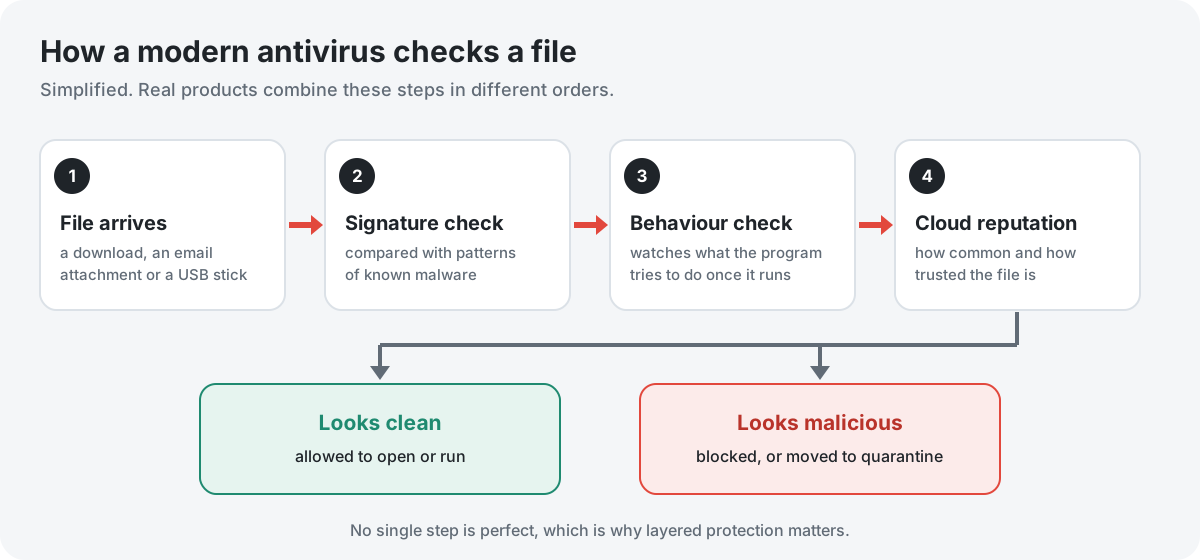
The word “antivirus” is a little out of date. Current products, including Avast's, combine several techniques. Each one catches threats the others can miss.
1. Signature matching
The oldest technique. The software compares files against a database of patterns from malware that has already been identified. It is fast and reliable for known threats, but it cannot recognise something brand new. That is why the database is updated constantly, often several times a day.
2. Heuristics and behaviour monitoring
To catch new or modified malware, the software looks at what a program is built to do, or watches what it actually does once it runs. Examples include trying to encrypt many files quickly, changing system settings, or injecting code into other programs. Avast's documentation calls its real-time components “shields”, including a behaviour shield that watches running applications. Behaviour-based detection catches more new threats, but it can also produce occasional false alarms.
3. Cloud reputation
Many products check unknown files against a cloud service that knows how common a file is and whether it has been seen behaving badly elsewhere. Avast says its detection draws on data from its large user base. This lets products react quickly to new outbreaks. It also means some information about files on your device is sent to the vendor, which is one reason to read the privacy settings.
4. Web and email protection
Much malware never touches your hard drive as an ordinary file. Web protection blocks connections to known malicious or phishing sites, and email scanning checks attachments. Avast's free antivirus for Windows has included web and mail protection components. As with every feature mentioned here, check the current product page for the version you are installing.
What Avast offers
Avast was founded in Czechoslovakia in 1988 and became one of the most widely used consumer antivirus brands. In 2022 it merged with NortonLifeLock, and the combined company is now called Gen Digital. Avast products are still developed and sold under the Avast name.
At the time of writing, Avast's line-up consists of:
- A free antivirus, mainly for Windows, with real-time scanning and the shields described above.
- Paid plans that add extra security and privacy tools. Over the years these have been sold under names such as Avast Premium Security, Avast Ultimate and Avast One, with different bundles of features.
- Separate products, such as Avast's VPN (SecureLine VPN), which may be sold on their own or included in certain bundles.
Plans change. Product names, which features belong to which tier, the number of devices covered and prices all change over time and can differ between countries. We deliberately do not quote prices or feature-by-tier lists here, because they go out of date quickly. Use the comparison table on Avast's own website. Avast's own information always prevails over anything on this page.
Free or paid: what changes
For many home users, the most useful question is not “Avast or not?” but “Do I need a paid plan at all?”
| Question | Free antivirus | Paid plan |
|---|---|---|
| Real-time malware protection | Yes. This is the core of the free product. | Yes |
| Web and email protection | Included in the free Windows antivirus, according to Avast's product pages | Yes |
| Own firewall | Generally not. On Windows, the built-in Windows Firewall stays active. | Included in some paid tiers |
| VPN, identity or breach-monitoring tools | Not included, or very limited | Depends on the plan. Check before buying. |
| Upgrade prompts | Expect them | Fewer, though offers for other products may appear |
| Cost | No charge | Subscription, usually set to renew automatically |
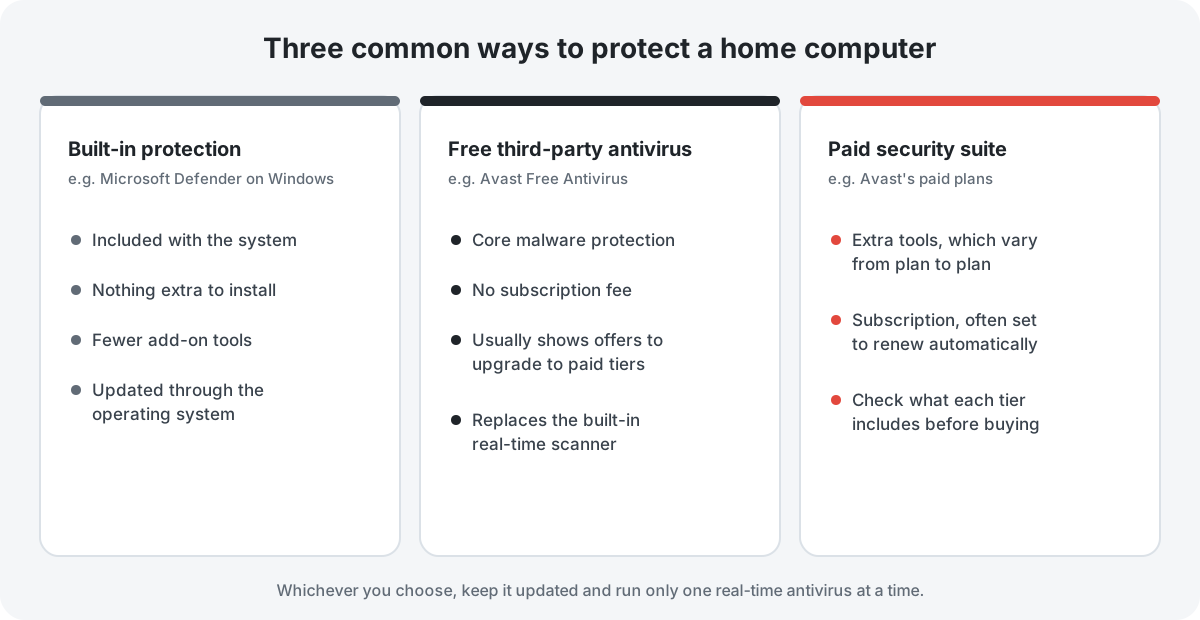
If what you mainly want is reliable malware protection, the free version, or simply Microsoft Defender on Windows, may be enough. Paid plans make sense if you specifically want one of the extra tools and would rather have it from one vendor than buy it separately. Compare what you would actually use against the renewal price, not just the first-year discount.
Windows, Mac, Android and iPhone
- Windows is where Avast's free antivirus started and where most of its features are aimed. When a third-party antivirus is installed and active, Microsoft Defender's real-time protection steps back automatically, so the two do not run at the same time.
- macOS: Avast offers a Mac product. macOS has its own built-in protections (such as Gatekeeper and XProtect), so a third-party product adds a further layer rather than filling a gap.
- Android: Avast offers an Android security app. Installing apps only from Google Play and keeping Google Play Protect switched on remains the most important step.
- iPhone and iPad: Apple's design does not let any app scan other apps the way desktop antivirus does. Security apps for iOS, including Avast's, mostly offer features such as web filtering, VPN or breach alerts, not classic virus scanning. Keeping iOS updated is the main protection.
Reading independent test results
Every vendor says its product is fast and accurate. Independent test labs provide a check. Two of the best known are AV-TEST (Germany) and AV-Comparatives (Austria). Both regularly test consumer products, including Avast's, for protection, performance impact and false alarms, and they publish the results on their websites.
When you read lab results:
- Look at several test rounds, not one. Results move a little from round to round.
- Check the false-positive score. A product that flags harmless files is irritating, and it trains you to ignore warnings.
- Check performance, especially on an older computer.
- Note which product version was tested. Labs test a specific product, which may be the free or a paid edition.
- Remember the gaps are often small. Many mainstream products, including the built-in Microsoft Defender, score well in recent rounds. Differences in features, price and privacy may matter more to you than a fraction of a percentage point.
We do not reproduce scores here because they change with each round. Look up the latest results directly on the labs' websites (see Sources).
Privacy: what to know
Security software sees a lot: the files on your device, the websites you visit, sometimes your email. Trust matters, and it is fair to tell you about Avast's history here.
In early 2020, journalists reported that Jumpshot, an Avast subsidiary, had been selling browsing data collected from users of Avast's software. Avast closed Jumpshot shortly afterwards. In February 2024 the US Federal Trade Commission (FTC) announced an order that requires Avast to pay $16.5 million and bans it from selling or licensing browsing data from its products for advertising purposes. European regulators have also examined the matter.
This does not mean the software fails to protect you, but it is a good reason to:
- read the privacy settings during and after installation, and switch off any optional data sharing you do not want;
- check which extra components (for example, browser extensions) are being installed, and decline the ones you do not need;
- read the vendor's current privacy policy, which, for an EU resident, should describe the legal basis for each use of your data.
Alternatives, including free ones
You are not obliged to install anything extra:
- Microsoft Defender comes with Windows 10 and 11, is switched on by default and updates through Windows Update. For many careful users it is a reasonable baseline at no cost.
- Other free antivirus products exist from several well-known vendors. They generally work the same way: core protection is free, with prompts to upgrade.
- Other paid suites from established vendors compete with Avast's paid plans on features and price. Compare what is actually included, how many devices are covered and how renewal works.
Whatever you choose, run only one real-time antivirus at a time. Two active real-time scanners can conflict, slow the computer down and even reduce protection.
Before and after you install
Before
- Download only from the official website or the official app store. Fake security software is itself a common way to spread malware.
- Remove any other third-party antivirus first, using its uninstaller.
- Read each installer screen. Installers for free software sometimes offer optional extras such as a browser or additional apps. Untick what you do not want.
After
- Run a first full scan and check that real-time protection shows as active.
- Review notification and privacy settings, and switch off data sharing you have not chosen.
- If you buy a subscription, note the renewal date and price, and check how to switch off automatic renewal if you do not want it. Check the refund terms shown at checkout. Under EU consumer law you generally have withdrawal rights for online purchases, but these can be limited for digital content you have started to use, so read the conditions.
Antivirus is one layer
Security professionals talk about “defence in depth”: several imperfect layers together are much stronger than any single layer.
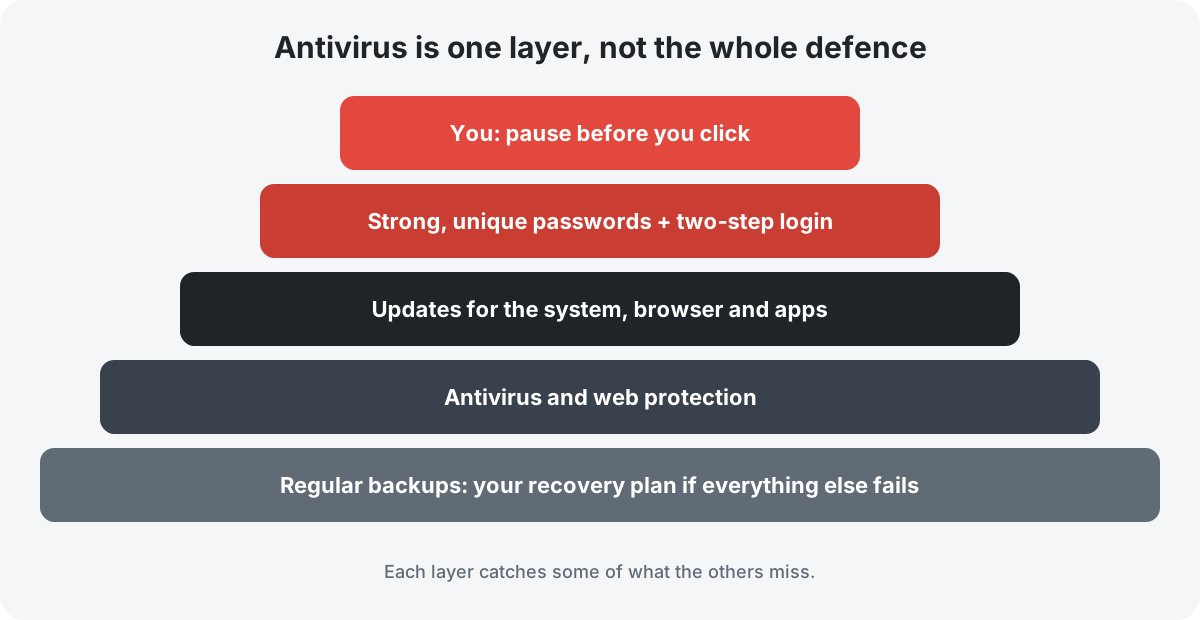
- Updates: install operating system, browser and app updates promptly. Many attacks exploit flaws that have already been fixed.
- Passwords and two-step login: use a unique password for every important account (a password manager helps), and switch on two-step verification for email, banking and social media.
- Backups: keep copies of important files that malware cannot reach. See our guide to the 3-2-1 backup rule.
- Habits: be suspicious of urgency, unexpected attachments and links. See how to spot a phishing message.
For a complete routine, use our home device security checklist.
Who it may suit, and who may not need it
Avast may suit you if you want a familiar, easy-to-use product, you are happy to use a free tier and ignore upgrade prompts, or you specifically want one of the extra tools in a paid plan and prefer to manage it from one dashboard.
You may not need it if you use an up-to-date Windows PC with Microsoft Defender active and you are comfortable with that, or if your main concern is privacy and you would rather keep the number of companies with deep access to your devices to a minimum.
Be cautious with any vendor if you are offered a “limited-time” price with a much higher renewal price. Calculate the second-year cost before you subscribe.
Want to look at Avast's current plans?
You can compare Avast's free and paid options and check the current prices and terms for your country on Avast's website.
See Avast's plans on its websitePartner link · advertisementThis is an affiliate link. If you buy through it, the publisher of this site may earn a commission. It costs you nothing extra and does not change the price you pay.
Frequently asked questions
Is Avast Free Antivirus really free?
Yes, there is no charge for the free antivirus. In return you can expect prompts to upgrade or to try other products. Read the installer screens carefully so that you only install what you want.
Does Avast slow down a computer?
All real-time security software uses some resources. How much depends on the computer and the version. Independent labs measure this impact; see the latest AV-TEST or AV-Comparatives performance results rather than relying on vendors' claims, including any made on promotional pages.
Can I run Avast and Microsoft Defender together?
Not both as real-time scanners. When Avast's real-time protection is active, Windows normally switches Defender's real-time protection off automatically. Running two real-time scanners at once is not recommended.
Does antivirus protect against phishing?
Partly. Web protection can block known phishing sites, but new phishing pages appear constantly and may not be blocked yet. Recognising the warning signs yourself is still essential.
Will any antivirus make me 100% safe?
No. No product can guarantee that. Be wary of any website, including advertising, that promises complete or guaranteed protection.
How do I cancel automatic renewal?
Vendors usually let you manage subscriptions from your online account. The exact steps change, so follow the current instructions on the vendor's support site.
Sources and method
This guide was written by Susan Smith from public information. We did not receive products, payment for coverage or review copies from Avast, and we did not run our own lab tests. Statements about Avast's products are based on Avast's public product and support pages. Statements about test results refer you to the labs' own publications. The section on data privacy is based on the FTC's public announcement. Where a detail could not be verified for every country and version, we say so.
- Avast, official website and product comparison pages: avast.com
- Gen Digital Inc., corporate information: gendigital.com
- US Federal Trade Commission, “FTC Order Will Ban Avast from Selling Browsing Data for Advertising Purposes, Require It to Pay $16.5 Million”, press release, February 2024: ftc.gov press releases
- AV-TEST, independent test results for consumer security software: av-test.org
- AV-Comparatives, independent test results: av-comparatives.org
- Microsoft Support, Microsoft Defender Antivirus in the Windows Security app: support.microsoft.com
- ENISA, European Union Agency for Cybersecurity, Threat Landscape reports: enisa.europa.eu
- NÚKIB, Czech National Cyber and Information Security Agency: nukib.gov.cz
Divergence. If anything on this page differs from the information published by Avast (features, prices, platforms or terms), Avast's own information prevails. Spotted an error? Please tell us. Our corrections procedure explains what happens next.
About the visuals: all illustrations and diagrams on this page were created by celeno.online as original SVG drawings. They are not product screenshots and do not show Avast's software or logos.
Trademark notice: Avast is a trademark of its owner. This site is not affiliated with, endorsed by or sponsored by Avast or Gen Digital.